C#
When production issues happen, logs should clearly show what started, what happened in between, and how it ended. A simple and consistent pattern using _logger with Application Insights can make troubleshooting much easier.
Here is a practical example for an operation like retrieving role assignments.
Start – Log inputs clearly
Log the action and key parameters at the beginning:
const string action = "Retrieve role assignments for scope";
var stopwatch = Stopwatch.StartNew();

_logger.LogInformation("Start {Action}. Scope={Scope}, RoleId={RoleId}",
    action, scope, roleId);
This creates structured properties (Action, Scope, RoleId) that are searchable in Application Insights.
Flow – Log important checkpoints
Log meaningful steps inside the method:
_logger.LogInformation("Flow {Action} – calling external service. Scope={Scope}",
    action, scope);
Only log major steps. Avoid too many details.
End – Log result summary and duration
When successful:
stopwatch.Stop();

_logger.LogInformation("End {Action}. Count={Count}, ElapsedMs={ElapsedMs}",
    action, result.Count, stopwatch.ElapsedMilliseconds);
Include result summaries (like counts) and execution time. This helps detect performance issues.
Fail – Log exception with full context
On failure:
catch (Exception ex)
{
    stopwatch.Stop();

    _logger.LogError("Fail {Action}. Scope={Scope}, RoleId={RoleId}, ElapsedMs={ElapsedMs}, Exception={Exception}",
        action, scope, roleId, stopwatch.ElapsedMilliseconds, ex);

    throw;
}
Always pass the exception to LogError. Application Insights will capture the stack trace automatically.
Why This Works
- Messages are easy to read
- Properties are structured and searchable
- Start, Flow, End, and Fail follow the same pattern
- Operations teams can trace full execution paths
With this consistent approach, logs become a reliable story of what your system did — and why.
How to Convert Dictionary Keys into a Comma-Separated String in C#
When working with a Dictionary<string, object> in C#, you may need to get all the keys as a single string. This can be done easily using the built-in string.Join method.
Here’s a simple example:
var dict = new Dictionary<string, object>
{
    { "Name", "Alice" },
    { "Age", 30 },
    { "Country", "USA" }
};

string keys = string.Join(",", dict.Keys);
Console.WriteLine(keys); // Output: Name,Age,Countrydict.Keysgives you the collection of keysstring.Joincombines them with commas
This approach is clean, fast, and works well for logging, debugging, or exporting keys.
TryCombineUrl follows the .NET convention for “Try” methods by returning a bool indicating success and providing the result via an out parameter. This approach is ideal when logging failures explicitly or when avoiding exceptions is critical. It can be used in structured logging or conditional logging scenarios where fallback logic may be required.
public static class LoggingHelpers
{
    public static bool TryCombineUrl(Uri? baseAddress, string path, out string? fullUrl)
    {
        try
        {
            if (string.IsNullOrWhiteSpace(path))
            {
                fullUrl = baseAddress?.ToString() ?? string.Empty;
            }
            else if (baseAddress == null)
            {
                fullUrl = path;
            }
            else
            {
                fullUrl = new Uri(baseAddress, path).ToString();
            }

            return true;
        }
        catch
        {
            fullUrl = null;
            return false;
        }
    }
}The CombineUrl method offers a safe, reusable way to concatenate a base URI and path string for logging purposes. It is wrapped in a try-catch block to avoid exceptions from malformed input, making it reliable for use in production logging. This method returns a string and can be placed inside a centralized LoggingHelpers class for consistent use across the codebase.
public static class LoggingHelpers
{
    public static string CombineUrl(Uri? baseAddress, string path)
    {
        try
        {
            if (string.IsNullOrWhiteSpace(path))  return baseAddress?.ToString() ?? string.Empty;

            if (baseAddress == null)  return path;

            return new Uri(baseAddress, path).ToString();
        }
        catch (Exception ex)
        {
            return $"[InvalidUrl: {ex.Message}]";
        }
    }
}In structured logging within C#, it's common to log endpoint URLs that consist of a base address and a path. To ensure safe and consistent logging, developers should use a centralized utility method to combine these values without risking exceptions or malformed URLs. This Snipp outlines two recommended approaches for implementing this functionality in a logging-safe way.
Logging in C# is a critical practice for monitoring application behavior, diagnosing issues, and gaining operational insights. Whether building desktop applications, APIs, or cloud-native services, effective logging allows developers and operators to understand how the system behaves in real time and after the fact.
When working with collections in C#, it's common to extract and concatenate specific property values for display or logging purposes. For instance, if you have a list of objects and want to join the values of a particular string property, you can use LINQ in combination with string.Join.
Scenario
You have a list of objects, each with a Name property, and you want to create a single comma-separated string of all names.
Solution
Use LINQ to project the property and string.Join to concatenate the results.
var names = string.Join(", ", items.Select(i => i.Name));Notes
itemsis aList<T>whereThas aNameproperty.Select(i => i.Name)projects the desired propertyNamefrom each ItemItem.string.Joinconcatenates the values with a defined separator (e.g.,", "in this case).- To avoid nulls, you can add
.Where(x => !string.IsNullOrEmpty(x.Name)).
This method is clean, efficient, and readable—ideal for transforming object data into user-friendly output or log formats.
Problem Statement: Extracting extended file properties, such as the Media Created Date, is necessary for certain applications. Utilizing the Microsoft.WindowsAPICodePack.Shell namespace facilitates this task efficiently.
Approach: Utilize the ShellObject class from the WindowsAPICodePack.Shell namespace to access extended file properties. Specifically, retrieve the Media Created Date using the System.Media.DateEncoded property.
using Microsoft.WindowsAPICodePack.Shell;

ShellObject shell = ShellObject.FromParsingName(path);
var mediaCreatedDate = shell.Properties.System.Media.DateEncoded;
Explanation: This code utilizes the ShellObject class to access extended file properties. It fetches the Media Created Date of a file specified by its path using the System.Media.DateEncoded property, providing crucial metadata for various applications.
Further resources
C# includes specialized classes that store series of values or objects are called collections.
There are two types of collections available in C#: non-generic collections and generic collections.
The System.Collections namespace contains the non-generic collection types and System.Collections.Generic namespace includes generic collection types.
Additional reading at C# Generic & Non-generic Collections (tutorialsteacher.com)
C# is a strongly-typed language. It means we must declare the type of a variable that indicates the kind of values it is going to store, such as integer, float, decimal, text,
Additional reading at Data types in C# (tutorialsteacher.com)
In C#, a string is a series of characters that is used to represent text. It can be a character, a word or a long passage surrounded with the double quotes ". The following are string literals.
// String Literal Examples
"S"
"String"
"This is a string."To filter out nullable strings and obtain only non-null strings, you can use LINQ Where method along with a null check. Here's an example:
IEnumerable<string?> nullableStrings //

List<string> nonNullStringsList = nullableStrings
    .Where(s => s != null) // Filter out null values
    .Select(s => s!)       // Convert nullable strings to non-nullable
.ToList(); // Convert IEnumerable to List- We use LINQ extension methods
Whereto filter out null values andSelectto convert nullable strings to non-nullable strings (string!indicates a non-nullable reference type in C# 8.0 and later). - Finally, we use
ToList()to convert the filtered enumerable to aList<string>.
The JsonSerializer.Deserialize parses the text representing a single JSON value into an instance of a specified type.
using System.Text.Json;

string json = @"{""Name"":""Krish Jackon"", ""Gender"":""female"",
    ""DateOfBirth"":{""year"":1985,""month"":03,""day"":30}}";

var user = JsonSerializer.Deserialize<User>(json);
Resources to deserialize to dynamic object
The JsonSerializer.Serialize converts the value of a specified type into a JSON string.
using System.Text.Json;

var user = new User("Krish Jackon", "female", new MyDate(1985, 03, 30));

var json = JsonSerializer.Serialize(user);
Console.WriteLine(json);In C#, to compare two strings ignoring case sensitivity, you can use the string.Equals method with StringComparison.OrdinalIgnoreCase as shown below:
string val = "aStringValue";
bool isEqual = string.Equals(val, "astringvalue", StringComparison.OrdinalIgnoreCase);
This code snippet compares the val string with "astringvalue" regardless of case sensitivity and returns a boolean indicating if they are equal.
For more details and discussions about comparing strings in C# while ignoring case, you can refer to this Stack Overflow thread: Comparing two strings ignoring case in C#.
To deserialize JSON into a dynamic object in C# using System.Json, follow these steps:
- Parse the JSON string using JsonValue.Parse() to obtain a JsonValue object.
- Convert the JsonValue object to a dynamic object using the JsonValue.ToDynamic() extension method.
Here's an example code snippet:
using System.Json;

string jsonString = "{\"name\":\"John\",\"age\":30}";
JsonValue jsonValue = JsonValue.Parse(jsonString);
dynamic dynamicObj = jsonValue.ToDynamic();

Console.WriteLine($"Name: {dynamicObj.name}, Age: {dynamicObj.age}");
For more advanced JSON deserialization scenarios in C#, using libraries like Json.NET (Newtonsoft.Json) is recommended.
Some helpful links
- Deserialize JSON object into dynamic object using JSON.NET: This Stack Overflow thread provides insights into using JSON.NET to deserialize JSON into dynamic objects, offering code examples and explanations.
- C# Deserialize JSON into Dynamic Object: This tutorial from Code Maze explores deserializing JSON into dynamic objects in C# using Newtonsoft.Json.
- Deserializing dynamic JSON: Here, you can find discussions and solutions for deserializing dynamic JSON objects using different libraries and techniques.
- Deserialize JSON string into dynamic object using System.Text.Json: This Stack Overflow post delves into deserializing JSON strings into dynamic objects using System.Text.Json.
- Serialize C# anonymous type to a JSON string: Explore serialization of C# anonymous types to JSON strings, which can be relevant for dynamic object handling.
- Deserialize JSON into list of anonymous type: Learn about deserializing JSON into a list of anonymous types, which can be part of handling dynamic JSON data structures.
Design patterns are reusable solutions to common problems in software design and factory design pattern is one of the common design patterns.
The Factory method is a creational design pattern that provides an interface for creating objects without specifying their concrete classes. It defines a method that we can use to create an object instead of using its constructor. The important thing is that the subclasses can override this method and create objects of different types.
Resources
The JsonDocument.Parse parses a stream as UTF-8-encoded data representing a single JSON value into a JsonDocument. The stream is read to completion.
using System.Text.Json;

string data = @" [ {""name"": ""Krish Jackon"", ""phoneNumber"": ""123456""},
    {""name"": ""Marc Moore"", ""phoneNumber"": ""654321""} ]";

using JsonDocument doc = JsonDocument.Parse(data);
JsonElement root = doc.RootElement;The ObsoleteAttribute in .NET Framework is used to mark types or members as obsolete, indicating they will be removed in future versions. This helps prevent breaking existing code that relies on these elements. Here's an example:
using System;

public class MyClass
{
    [Obsolete("Method1 is deprecated, please use Method2 instead.", true)]
    public void Method1()
    {
        // Deprecated code here
    }

    public void Method2()
    {
        // New code here
    }
}
In this example, calling Method1() will raise a compilation error due to the true parameter, enforcing the use of Method2() instead.
Adittional resources:
- c# - How to mark a method as obsolete or deprecated? - Stack Overflow
- c# - How to mark a class as Deprecated? - Stack Overflow
- ObsoleteAttribute Class (System) | Microsoft Learn
- What's obsolete in .NET Framework - .NET Framework | Microsoft Learn
- How to Mark Methods as Deprecated in C# - Code Maze (code-maze.com)
When dealing with nested lists in C# and needing to flatten them, LINQ's SelectMany method comes in handy. Here's a simple example:
var orders = new List<Order>();
var distinctOrderLines = orders.SelectMany(order => order.OrderLines).Distinct();
This code snippet flattens the orders list containing lists of OrderLines into a single sequence of distinct OrderLines.
For more information and examples, you can refer to these resources
All types and type members have an accessibility level. The accessibility level controls whether they can be used from other code in your assembly or other assemblies.
| Caller's location | public |
protected internal |
protected |
internal |
private protected |
private |
|---|---|---|---|---|---|---|
| Within the class | ✔️️ | ✔️ | ✔️ | ✔️ | ✔️ | ✔️ |
| Derived class (same assembly) | ✔️ | ✔️ | ✔️ | ✔️ | ✔️ | ❌ |
| Non-derived class (same assembly) | ✔️ | ✔️ | ❌ | ✔️ | ❌ | ❌ |
| Derived class (different assembly) | ✔️ | ✔️ | ✔️ | ❌ | ❌ | ❌ |
| Non-derived class (different assembly) | ✔️ | ❌ | ❌ | ❌ | ❌ | ❌ |
See more at Access Modifiers - C# Programming Guide - C# | Microsoft Learn
This example in C# illustrates an implementation of the Retry pattern. The purpose of this method is to repeatedly attempt to execute a piece of code (referred to as the "main logic") until either the operation is successful or a specified number of retries has been reached.
public async Task RetryAsync()
{
  int retryCount = 3;
  int currentRetry = 0;

  for (;;)
  {
    try
    {
      // main logic here

      break; // Return or break.
    }
    catch (Exception ex)
    {
      currentRetry++;

      if (currentRetry > this.retryCount) throw;
    }

    await Task.Delay(TimeSpan.FromSeconds(5));
  }
}
Breakdown of the code:
- Initialization
- Infinite Loop (
for (;;))- The method enters an infinite loop using a
forloop without a condition, meaning it will continue indefinitely until explicitly broken out of. - Inside the loop:
- If the main logic succeeds, the break statement is encountered, and the loop is exited.
- If an exception occurs during the main logic execution (catch (Exception ex)), the catch block is executed.
- The method enters an infinite loop using a
- Handling Exceptions
currentRetry++;: Increments thecurrentRetrycounter each time an exception is caught.- Checks whether the number of retries (
currentRetry) has exceeded the maximum allowed retries (retryCount).- If the maximum retries have been reached, the exception is rethrown using
throw;, propagating it further. - If the maximum retries have not been reached, the method proceeds to the next iteration after a delay.
- If the maximum retries have been reached, the exception is rethrown using
- Delay Between Retries
ImageSharp - A cross-platform library for the processing of image files; written in C#
Compared to System.Drawing ImageSharp has been able to develop something much more flexible, easier to code against, and much, much less prone to memory leaks. Gone are system-wide process-locks; ImageSharp images are thread-safe and fully supported in web environments.
using (Image<Rgba32> image = Image.Load("foo.jpg"))
{
    image.Mutate(x => x
         .Resize(image.Width / 2, image.Height / 2)
         .Grayscale());
    image.Save("bar.jpg"); // Automatic encoder selected based on extension.
}
ImageSharp Documentation
- Getting Started (sixlabors.com)
- Resizing Images (sixlabors.com)
- Class ResizeExtensions (sixlabors.com)
Some Discussions
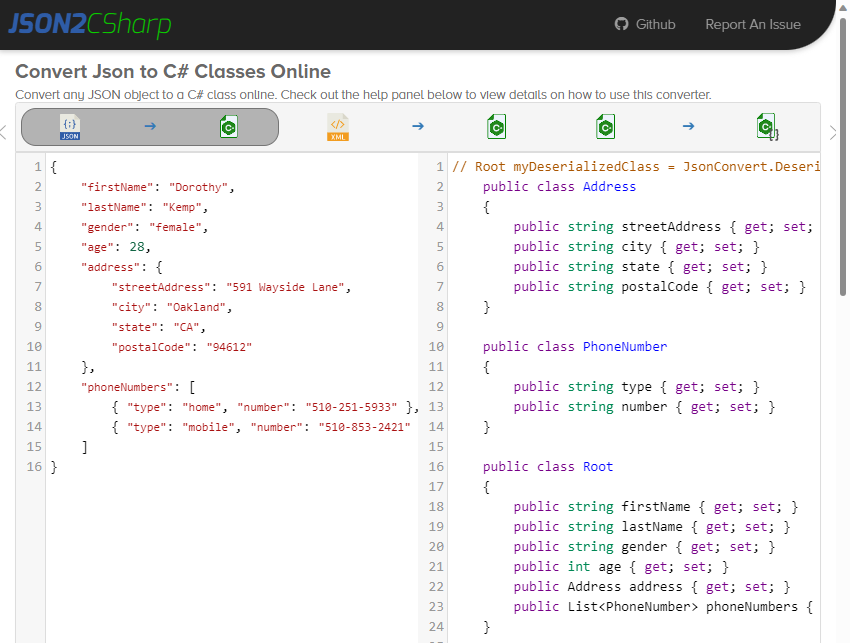
Convert any JSON object to a C# class online with the Json2CSharp Toolkit.
) { image.Mutate(x => x .Resize(image.Width / 2, image.Height / 2) .Grayscale()); image.Save("bar.jpg"); // Automatic encoder selected based on extension. }%0d%0a ImageSharp Documentation%0d%0a Getting Started (sixlabors.com) Resizing Images (sixlabors.com) Class ResizeExtensions (sixlabors.com) Some Discussions%0d%0a How can I decrease image size as low as possible with resize? · Discussion #1521 · SixLabors/ImageSharp · GitHub c# - SixLabors ImageSharp produces huge image files - Stack Overflow %0D%0Afrom https://snippset.com/%0d%0a)
See at Convert JSON to C# Classes Online - Json2CSharp Toolkit
Semaphore is mainly used in scenarios where we have a limited number of resources and we have to limit the number of threads that can use it. The semaphore class lets you limit the number of threads accessing a critical section.
Semaphores are Int32 variables stored in an operating system's resources. When we initialize the semaphore object, we initialize it with a number. This number limits the threads that can enter the critical section.
For using a semaphore in C#, you just need to instantiate an instance of a Semaphore object.
public static class SemaphoreSample
{
    public static void Execute()
    {
        for (int i = 0; i < 5; i++)
        {
            Thread doWorkThread = new Thread(new ParameterizedThreadStart(doWork));

            doWorkThread.Start(i);
        }

        Console.ReadLine();
    }

    //A semaphore is very similar to lock/Monitor. The difference is that it can allow for a specified amount of threads to work with the same resources at the same time.
    //Make a semaphore that allows for up to two threads to work with the same resource.
    private static Semaphore semaphore = new Semaphore(1, 1); //Semaphore(initial thread count, max thread count)

    private static void doWork(object threadNumber)
    {
        try
        {
            //The code will stop executing here and wait until the lock is released by the previous thread.
            semaphore.WaitOne();

            Console.WriteLine("Thread " + threadNumber.ToString() + " has started.");

            //Simulate doing time consuming work.
            Thread.Sleep(1500);

            Console.WriteLine("Thread " + threadNumber.ToString() + " is done.");
        }
        finally
        {
            //Realesase the lock so other threads can now get access.
            semaphore.Release();
        }
    }
}Mutex also helps us to ensure that our code is thread-safe. That means when we run our code in a multi-threaded environment then we don’t end up with inconsistent results.
public static class MutexSample
{
    public static void Exeute()
    {
        for (int i = 0; i < 5; i++)
        {
            Thread doWorkThread = new Thread(new ParameterizedThreadStart(doWork));
            doWorkThread.Start(i);
        }

        Console.ReadLine();
    }

    //Mutex(mutual exclusion) is very similar to lock/Monitor. The difference is that it can work across multiple processes.
    //Make mutex.
    private static Mutex mutex = new Mutex();

    private static void doWork(object threadNumber)
    {
        try
        {
            //The code will stop executing here and wait until the lock is released by the previous thread.
            mutex.WaitOne();

            Console.WriteLine("Thread " + threadNumber.ToString() + " has started.");

            //Simulate doing time consuming work.
            Thread.Sleep(1500);

            Console.WriteLine("Thread " + threadNumber.ToString() + " is done.");
        }
        finally
        {
            //Realesase the lock so other threads can now get access.
            mutex.ReleaseMutex();
        }
    }
}- .NET
- Agile
- AI
- ASP.NET Core
- Azure
- C#
- Cloud Computing
- CSS
- EF Core
- HTML
- JavaScript
- Microsoft Entra
- PowerShell
- Quotes
- React
- Security
- Software Development
- SQL
- Technology
- Testing
- Visual Studio
- Windows